Blender (Not) Verity™ Project Download
Table of Contents
Description
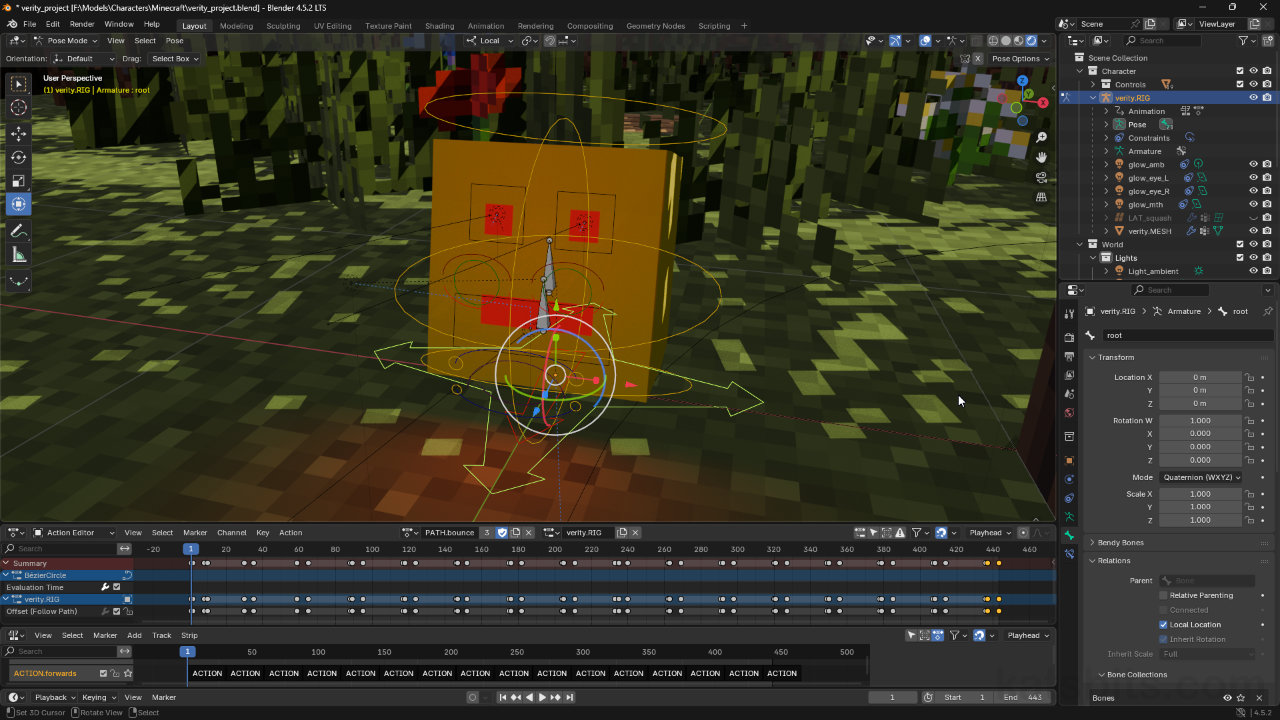
The Blender (not)Verity™ Project ZIP file below contains a .blend featuring a rigged and animated character inspired by the Verity movie for Minecraft (not suitable for young children). Here, Verity is a cube rather than sphere. The main scene includes a simple track or path the character follows, divided into two key components: a looping character animation and a composited track loop. The track loop instances the character animation repeatedly along the path, creating an extended animation sequence from a shorter, reusable character animation loop (cycle). This setup offers an efficient way to showcase continuous character movement within a dynamic environment, and is provided by way to example this approach to seemingly complex characters animation.
Download
Download: KatsBits (not) Verity™ Project (c. 2MB | *.blend, *.png).
Fan Art and Copyright
The purpose of this project is to provide a familiar setting through which character rigging and animation can be investigated and explored. As such, the project makes use of content subject to Third-Party IP and Copyright. Read more about Fan Art and Third-Party IP & Copyright.
Character Animations
The character is rigged in two parts: 1) a main component that controls the main structure of the character, the facial deformation, position of the eyes, mouth etc., and 2) a lattice that controls the shape of the character, how it deforms overall. This setup is necessary because mesh deformation is difficult to achieve through vertex group and weight influence/distribution alone; even when weights are ‘smoothed’, any deviation or uneven distribution of vertices, edges and faces across the mesh effect how well or smoothly it can deform. Using a lattice avoids this issue by deforming at the Object (Object Mode) rather than Mesh (Edit Mode) level. The lattice is controlled from within the main character rig.
A better way to evenly deform an object is to use a lattice as this applies at the Object level and essentially bypasses any internal structural or vertex, edges or face distribution disparities.Scene Animation
Animation around the scene is controlled by a path, a Curve object typically a Bezier, Circle or Path object. The path itself isn’t animated. Instead the character rig targets the curve using a Follow Path modifier instance. This create a Parent » Child relationship that can then be animated indirectly by creating a corresponding character sequence in the Action Editor – the sequence is associated with the character, not the path. Using the Nonlinear Animation editor and adjusting some Curve settings in Object Data Properties, a sequence can be created that instances a shorter character loop, repeating it as it travels around the path.
Design note: scene animation reversal… [more]
Image top: the path along which the avatar travels is not animated – it has not sequence data associated with it. It simply acts as a track the character can follow or ‘track’ around. Image-bottom: the data actually used to track around the path is associated with the character, which can then be ‘composited’ using the Nonlinear Animation editor.Minecraft Scene
The Minecraft scene is a map block selection export from Minecraft that uses a single texture atlas; each of the images used in game are baked to a single 2048 x 2048 texture sheet during export from Minecraft that also includes alpha where appropriate (leaves, grass etc.). To edit texture assignments, for example to change the tree-type from ‘oak‘ to ‘dark oak‘, select the appropriate mesh parts in Edit Mode, then in UV Editing highlight the UVs and move them into place over the corresponding section of the image, effectively swapping old for new.
Design note: scene contents… [more]
The basic Minecraft scene in Blender is a small forest section with tree and grass alphas (transparency), through which the animation track is followed.


Timestamps
Times are approximate;
– n/a
