Files are listed by format and not application and may require supplimental scripts or file to operate fully.
-
MD5 export for Blender 2.63(+). Supports *.md5mesh & *.md5anim [support] [installation & usage]. Download »
-
MD5 Model Viewer for generic animated MD5 format models. Also supports ASE, OBJ & LWO. Download »
-
MD5 script updated/ported for use in Blender 2.62 only by motorsep. [support] [installation & usage]. Download »
-
MD5 for Blender 2.59. Exports *.md5mesh & *.md5anim. [support & bugs] [installation & usage]. [2.54/5 & 2.56/7]. Download »
-
Blender 2.49 *.md5mesh, *.md5anim & *.md5camera. [support] [installation & usage] [obs. v0.94_02]. Download »
-
MD5 Import. Supports generic md5mesh & md5anim files. 2.45 compatible, [obs. v0.3]. Download »
-
MD5 export Maxscript for 3DS Max v4 +. Supports *.md5mesh, *.md5anim & (limited) *.md5camera. Download »
-
General MD5 export for 3DS Max v4 +. Supports general *.md5mesh, *.md5anim. Download »
-
MD5 import Maxscript for 3DS Max v4 +. Support varies for *.md5mesh, *.md5anim & *.md5camera. Download »
-
MD5 export Maxscript for 3DS Max. Supports *.md5mesh, *.md5anim and *.md5camera. Download »
-
MD5 export for 3DS Max for *.md5mesh, *.md5anim & *.md5camera. Skin Modifier supported. Download »
-
MD5 import Maxscript for 3DS Max (v5). Supports *.md5mesh, *.md5anim and *.md5camera. Download »
-
MD5 export. Supports *.md5mesh, *.md5anim & *.md5camera. Copies content of "Listener Window". Download »
-
MD5 export. *.md5mesh, *.md5anim & *.md5camera. Copies "Listener Window". Skin Modifier support. Download »
-
MD5 tools for SoftImages XSI. Supports both *.md5anim & *.md5mesh. Download »
-
For Blender 2.63a. Includes sample file (courtesy of Kot In Action). [usage] [bug tracker] Download »
-
MD3 script for Blender 2.60a. Script is not backward compatible, see below for 2.5+/- [usage] [bug tracker] Download »
-
MD3 export for Blender 2.53(+).
Check Xembie for support & updates for latest updates. Download »
-
MD3 import/export for Blender 2.42(+). [installation & usage] [obs. v0.2-lgt] [Alt download]. Download »
-
An improved version of Pop'N'Fresh's MD3 exporter plugin for gmax. Download »
-
MD3 export script for Max v6 (may work with newer but untested). Download »
-
An improved version of Pop'N'Fresh's MD3 exporter plugin for 3DS Max. Download »
-
Zip contains required files to view MD3 models. Supports animations and full model 'tags'. Download »
-
ASE export for Blender 2.49. Saves smoothing for Unreal/UDK [installation & support]. Download »
-
ASE import/export script for Blender 2.56. [installation]. Works for UDK & UT3 [obs. 2.54]. Download »
-
Use this version of the blend2ase export script for Blender 2.41 and above (up to 2.43). Download »
-
Import and export script for Blender 2.53 only. Download »
-
Originally for Unreal Tournament but valid as a general ASE export script for Blender. [usage] Download »
-
ASE v0.6.10b export for Blender 2.44. Large meshes can be exported 'in place'. [obs v0.6.9] Download »
-
Use this version of the blend2ase script with Blender 2.36 only. Download »
-
ASE export for Blender 2.42/3. Supports UV maps and vertex colours [obs. 2.41]. Download »
-
Use this version of the blend2ase script with Blender 2.37a (or above, see below). Download »
-
Unreal/UDK Export script for Blender 2.45 and the *.psk/*.pas formats (Python may be required). Download »
-
*.blend file containing base MALE and FEMALE meshes without clothing, useful for accessory production. Download »
-
*.blend file containing both the male and female avatar heads to aid making hair and head accessories. Download »
-
ZIP includes project, prepped and example XML's to make IMVU rooms. Blender 2.68 or above. Download »
-
*.blend file contains PET template. Incl. two pre-rigged Armatures. NOTE: requires Blender 2.68 or above. Download »
-
ZIP includes project, prepped and example XML's to make IMVU furniture items. Blender 2.68 or above. Download »
-
*.blend file containing Avatar helpers and seating without Room or Furniture template materials. [OBJ] Download »
-
*.blend file contains FURNITURE template material for Frenzoo [tutorial] using Blender 3D. Download »
-
*.blend file contains ROOM template material for Frenzoo [tutorial] using Blender. Incl. avatar refs. Download »
-
A set of avatar meshes reference objects for use when making Rooms & Furniture items for Frenzoo. Download »
-
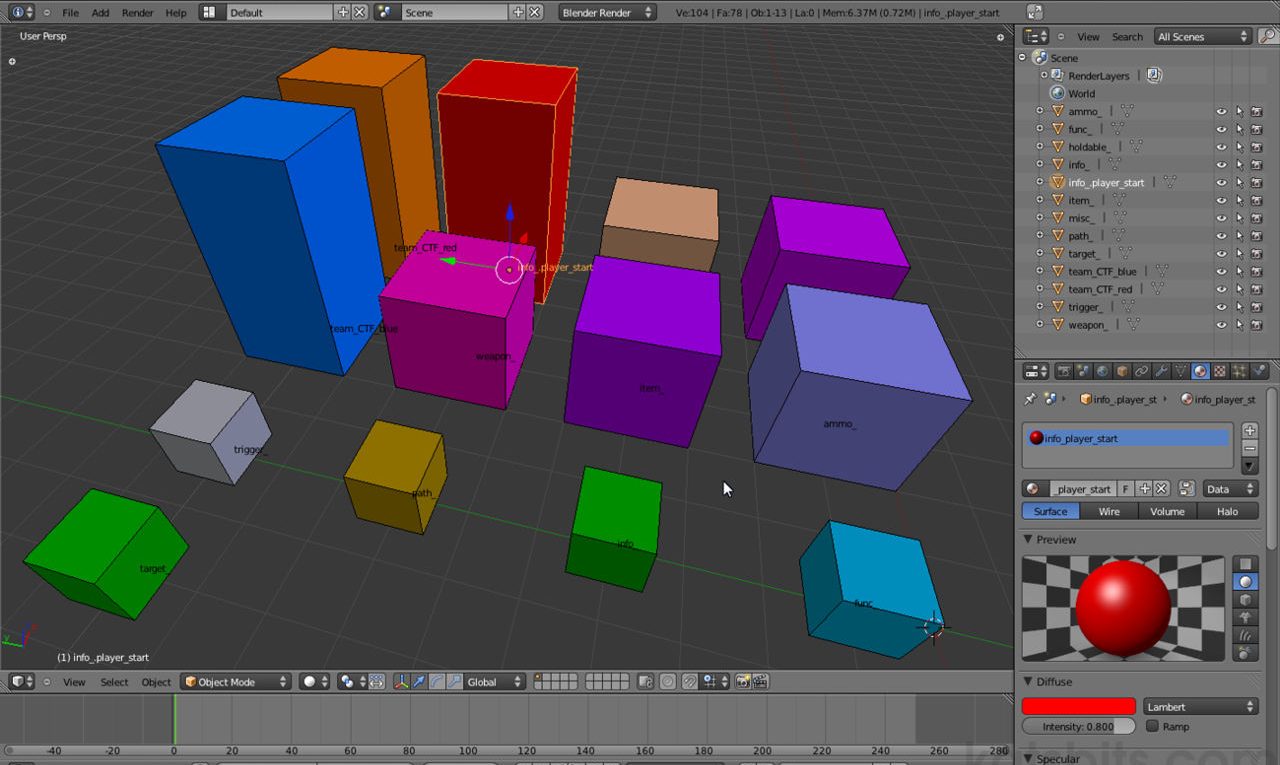
*.blend file contains common Editor Entities used in Radiant. Incl. "ammo_", "func_", "weapon_" etc. Download »
-
*.blend containing reference objects. Incl. 1283, 2563, 5123 and 10243 for Unreal/UDK, Radiant based Editing Download »
-
Shortcut hotkey chart for Blender. High-res PDF or PNG. Blank for custom maps as PDF & PNG. More Info » • Download »
-
*.blend & *.obj reference objects. Incl. 13, 23, 83, 323, 643, 1283, 2563, 5123, 10243 & generic NPC. Download »
-
Reference objects for 'BSP' style editing. Incl. standard "8" unit high steps (*.blend Blender file only). Download »
-
Reference objects for making BSP type game assets. Incl. NPC (RtCW), 643, 1283 & 2563. Blocks actual size. Download »
-
Essential interface to compile idTech 3 games & content. Also converts brushes to ASE meshes. Download »
-
Program for making Normal maps from 2D images and artwork. Licences available - 'Education', 'Personal' & 'Professional'.
-
Applet checks for non-standard (power of two) sized images. Supports *.dds, *.jpg, *.png and *.tga. Requires Java which needs to be set to to allow 'self-signed' apps to run (security). Visit Site »
-
Bake various types of 'maps' from high resolution meshes - normals, ambient, parallax etc. [site]. Download »
-
Outputs selected mesh/material/texture data to the Listerner for capture (export tutorial). Download »
-
The Gmax 'Listener' exe catures model data for copy/pasting to a text file and saving as *.obj. Download »
-
Final version of Q3Map2 for compiling idTech 3 compatible game content. File provided 'as is'. Download »
-
idTech 4 version of no longer available Compressonator. Read the creating DDS textures tutorial. Download »
-
Please Note : current Catalyst drivers do not require this tool as it is included as part of the installation process. Download »
-
An essential tool for game and content development & creation. Restores gamma correction back to 1.0, often used when game media is run full-screen. To use make a copy of, or create a program shortcut to, "Quickgamma.exe" in the "Startup" folder of Windows "Start" menu. Program will run at start with options available via a Taskbar icon. Download »
-
Accompanies Removing DirectX article. May cause issues when used instead of OEM gfx software. Download »
-
A infamous and all too frequent 'missing' DLL file associated with many games. Download and install to the location your problematic application is saying it should be. Download »