Content is copyright © KatsBits™ 2000-2013. All Rights Reserved.
No part of this web site may be reproduced (except for personal use) without prior written permission from KatsBits.com. For more infomation on copyright click here.
When using the resources on this page, make sure you read the Essential Copyright Information before hand.
An up to date master list of useful import and export scripts, tools and utilities for 3D modelling, game and interactive content creation.
Files are listed by format and not application.
For Blender 2.49 +/-
Open in "Text" view ("Shift+F11"), then "Alt+P" to 'run'
Or copy to "User Profile" location, typically "C:\" drive. Click here to read how to do this. Full installation of Python may be required for full functionality with some scripts.
For Blender 2.6 +/-
Install scripts to "scripts/io". Read how to do this here.
Updated MD5 export script ported over for use in Blender 2.63 by motorsep. For support and bug reporting click here. For Installation and usage instructions click here.
• Download >>
MD5 script updated/ported for use in Blender 2.62 only by motorsep. Click here for support and bug reporting. Click here for Installation and usage instructions.
• Download >>
Updated MD5 export script for Blender 2.59. Exports *.md5mesh & *.md5anim. Please read the development topic for trouble shooting and general (known) problems. Installation & usage instructions. Archive: 2.54/5 • 2.56/7.
• Download >>
Blender export suite supports the MD5 formats: *.md5mesh, *.md5anim and *.md5camera. Previous version is available here. For tips on using Blender for game related modelling see the following tutorials.
• Download >>
Companion script to the Blender exporter - current version 0.5. Imports md5mesh and md5anim files. Works with 2.45, previous version 0.3 available here.
• Download >>
The definitive MD5 model viewer for inspecting static and animated MD5 meshes. Also has support for the ASE, OBJ and LWO model formats, very handy general purpose viewer as a result.
• Download >>
An export tool for use with 3DS Max allowing export of custom models to Doom 3's MD5 format. Supports *.md5mesh, *.md5anim and *.md5camera.
• Download >>
3DS Max importer for Doom 3's MD5 format. Supports *.md5mesh, *.md5anim and *.md5camera. Script was originally for 3DS Max v5 so may or may not work with more up-to-date versions. Test before project use.
• Download >>
A similar MD5 suite to the above 3DS Max suite; supports *.md5mesh, *.md5anim and *.md5camera. The script has a functional limitation present because of gmax's internal workings which requires output to the gmax 'Listener Window'. For small models copy/pasting the text from the LW isn't a problem but for larger models you may need to Listerner Window grabber below.
• Download >>
A suite of MD5 tools for use with SoftImages XSI 3D app.
• Download >>
updated version of the MD3 export script for Blender 2.63a. Zip file also includes a simple test sample file (provided by the guys at Kot In Action). [usage] [bug tracker]
• Download
>>
Updated export only script for outputting models from Blender 2.53+ to the MD3 format.
Check Xembie for latest updates for latest updates/versions.
• Download >>
MD3 import & export scripts for Blender 2.42 (may work with versions up to 2.45 - test before use). For installation and general usage click here. Note: original MD3 exporter by Bob Holocombe is now archived. Alt download from XReal.
• Download >>
MD3 script update for operation with Blender 2.60a. Script is not backward compatible, see below for 2.5+/- [usage] [bug tracker]
• Download >>
An improved version of Pop'N'Fresh's MD3 exporter plugin for gmax.
• Download >>
MD3 export script for Max v6.
• Download >>
An improved version of Pop'N'Fresh's MD3 exporter plugin for 3DS Max.
• Download >>
This zip file contains all the required files in one convenient package to view MD3 models. Supports animations and full model 'tags'. N.B. not fully support on Windows 7.
• Download >>
A modified version of the ASE exporter for use with UnrealTech editing so forced 'smoothing' is saved as 3DS Max style smoothgroups which remain intact when models are imported in to the Unreal Engine [original forum topic].
• Download >>
Use this version of the blend2ase export script for Blender 2.41 and above (up to 2.43).
• Download >>
'Old Skool' ASE exporter originally for use with Unreal Tournament but equally usable as a general blend2ASE exporter. notes : models must be single mesh objects. Will only correctly export a single material. For more info on using this script read 'Prepping models for Doom 3.
• Download now >>
Use this version of the blend2ase script with Blender 2.36 only.
• Download >>
Use this version of the blend2ase script with Blender 2.37a (or above, see below).
• Download >>
ASE import and export script for Blender 2.56. For installation information and usage details click here. Works for ASE export to UDK & UT3 (with some limitations) [archive 2.54].
• Download >>
Import and export script for Blender 2.53 only. Does not work with 2.54+ so import ASE into 2.53, save and then open *.blend file into 2.54+ for further work.
• Download >>
New version 0.6.10b available for Blender 2.44 or above. Large meshes can be exported 'in place'. Previous version 0.6.9 (29 July 07) still available from here.
• Download now >>
Script supports mesh, UVWmaps and vertex paint data (note: for legacy purposesd ASE Import for 2.41 is available here).
• Download >>
Python export script for Blender 3D that facilitate the export of animated meshes and models to Epic's UNreal Engines *.psk and *.psa format. Requires Blender 2.45 or above and appropriate installation of Python.
• Download >>
Files may contain third party design copyright material. They should not be used outside their intended purpose or environment, nor redistributed in any form.
Currently only Blender 2.45, 2.49 or 2.63 or above are reasonably compatible with IMVU.
Blender file containing the base MALE and FEMALE avatar meshes without clothing mesh obstructions, useful for accessory production.
• Download >>
Sample file to accompany tutorial on using Blender 3D to make Frenzoo rooms and scene items. Includes avatar reference files for correct sizing.
• Download >>
A set of Blender 3D files that accompanies the tutorial about making furniture items for Frenzoo using Blender 3D. Files can be opened, inspected, edited and used to make 'test' items in Frenzoo.
• Download >>
A set of 4 sample template *.blend files; two 'raw' and 'prepped' versions for 'locked' and 'furniture' rooms. 'Raw' sample file contains the separate componants for each type of IMVU room. The 'prepped' Blender files contain 'completed' rooms of both types ready to be exported.
• Download >>
A set of avatar meshes for used as reference objects when making items for Frenzoo. Use to make sure objects are correctly sized ready for export.
• Download >>
Template file for making IMVU pet's and objects that use the locators placed around the avatar for that purpose. File includes two pre-rigged Armatures. NOTE: requires Blender 2.45/2.49
• Download >>
A Blender 3D file that has several ready-to-use components to allow easy and quick building of custom furniture items for IMVU; made with or without seating nodes.
• Download >>
Contained in the Blender 3D file are a number of components that can be used as size, position and construct templates. Also available are OBJ versions of the files for import, use and conversion in other 3D applications that require base template units.
• Download >>
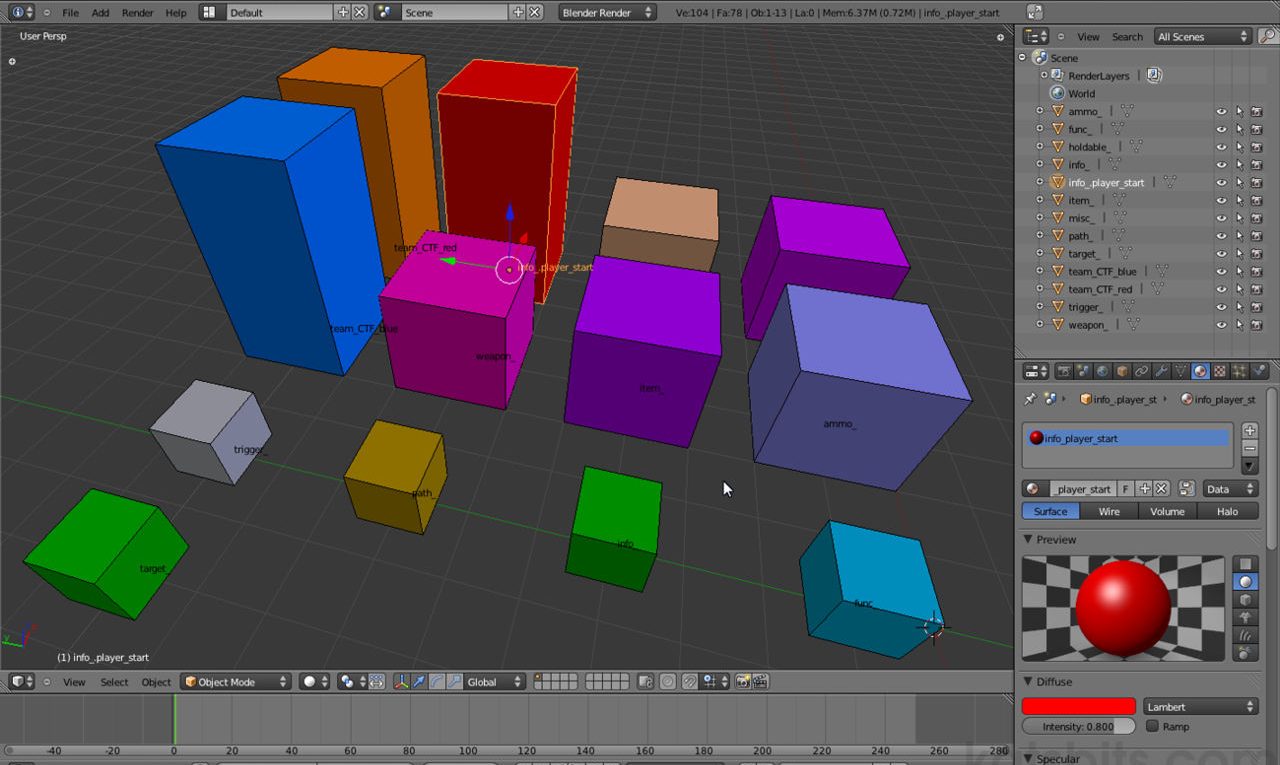
A .blend file comprising the core entities used for typical .map based level editing using Blender 2.58. Includes "ammo_", "func_", "weapon_" and others. Note item are placeholders only and not converted into actual entities. (File also includes version for 2.49).
• Download >>
![]()
Keyboard chart mapping basic hotkeys for Blender 2.5. Download high-res PDF or PNG. A blank also available as high-res PDF and PNG so custom hotkey maps can be printed.
More Info >> • Download >>

A series of basic steps for use as reference when making models for use in BSP type games incl. Radiant, UDK based games & level editors. Standard "8" unit high steps (*.blend Blender file only).
• Download >>
The essential tools for compiling Quake 3 based games and content. Used also to export and convert brushwork into ASE models for reuse in game.
• Download >>
Power of Two Tester (PoTT) applet check contents of folders for non-standard (power of two) sized images allerting user to and listing 'bad' image files. Supports *.dds, *.jpg, *.png and *.tga.
• Download >>
Constantly improving tool for generating normal maps, ambient occlusion and parallax displacement maps. Can be used for any game that supports the output. Requires .NET 2.0 on Windows XP machines (Web site link).
• Download >>
As mentioned above, use this script to 'grab' text from gmax's 'Listener' output window. It's necessary because gmax has a locked limit on the amount of information you can grab from the listener in one go which forces you to do several copy/pastes running the risk of missing sections of the file.
• Download >>
Please Note : the current version of the Catalyst drivers don't necessarily require this tool as it's included as part of the installation process. Your PC system will want to reboot after uninstall, Windows XP will prompt for drivers on reboot. You can 'cancel' this request and install new drivers properly.
• Download >>
A infamous and all too frequent 'missing' DLL file associated with many games. Download and install to the location your problematic application is saying it should be.
• Download >>
Reference pack containing mesh objects in various sizes - 1282, 2562, 5122 and 10242 - useful for Unreal, UDK, idTech and Radiant type game technology.
• Download >>
![]()
Contains *.blend & *.obj files for level design & content models for BSP type games - idTech & UDK etc. incl. 1x1, 2x2, 8x8, 32x32, 64x64, 128x128, 256x256, 512x512, 1024x1024 & generic NPC.
• Download >>
A set of blocks used as reference objects for model size when making BSP type game assets. Includes NPC (RtCW), 64x64, 128x128 and 256x256 unit blocks. Blocks actual size and represent same sized in editor brushes. RtCW NPC block is approx to other idTech games.
• Download >>
Considered by many as the tool for making normal maps from 2D art work. Although no longer free (there is a 30 day trail) it is the one application that is worth investing in for serious artists, especially if normal maps are a required part of the content creation process. Various licences are available - 'Education', 'Personal' and 'Professional' - note that Crazybump is the same regardless of licence.
Final version that was released to the public of ydnars much improved Q3Map2 compiler for use with games running on Quake 3 engine or that can use Quake 3 colpiled BSP files. File is provided 'as is'.
• Download >>
An essential tool for serious game and content development. Restores gamma correction back to 1.0, often used when game media is run full-screen. Setting QuickGamma up so it run at startup prevents or limits this adjustment.
• Download >>
If you're editing games powered by the Doom 3 engine then you'll need this particular version of the tool because later versions removed the specific filter used by Doom 3 to correctly compress normal maps to DDS. For information on how to use the tool read the creating DDS textures tutorial.
• Download >>
To accompany the Removing DirectX article on the use and abuse of DirectX. Use at your own risk - it does work but you may find side effects if there is no DirectX API installed on a system as the Windows OS uses it. You should reinstal the version of DirectX that came with your OS installation disc. e.g. Win98/DX5, WinXP/DX7.
• Download >>
Learn Blender 3D - learn to make a simple low-poly rigged and animated character
Blender & IMVU furniture - new to Blender? IMVU? Learn to make furniture quickly
Displaced Terrain Mesh - using displace to make a basic terrain +optimisation tips
Displace & Simple Terrain - making a simple terrain in Blender 2.49 using displace